Microsoft 365 Copilot & AI Architecture Consulting
Eliminate oversharing risks, architect zero-trust permission models, and build autonomous Copilot Studio agents tailored to your enterprise data.
The 4-Pillar AI Framework
Audit site-level permissions, "Everyone except external users", and broad links.
Automated classification, DLP policies, and encryption before licensing rollout.
Autonomous multi-turn agents grounded on internal SharePoint repositories.
Track user engagement metrics, prompt quality, and productivity hours returned.
End-to-End Microsoft Copilot Roadmap & Engineering Methodology
Transforming enterprise productivity requires more than purchasing licenses—it requires structured permission remediation, semantic index tuning, and custom agent orchestration.
Phase 1: Security & Oversharing Cleanse
Copilot operates with the user's effective permissions. If payroll spreadsheets, M&A presentations, or executive compensation memos are accessible via "Everyone except external users", Copilot will index and answer prompts quoting them. We deploy automated PowerShell scanners and Microsoft Purview Restricted SharePoint Search policies to lock down sensitive sites immediately.
- • Automated identification of open link sharing ("Anyone with link" and organization-wide links)
- • Deployment of SharePoint Restricted Access Controls (RAC) for executive site collections
- • Purview Sensitivity Labeling rules enforcing mandatory encryption on PII and financial records
Phase 2: Copilot Studio Custom Agent Development
Off-the-shelf Copilot handles general chat, but enterprise value stems from autonomous multi-turn agents. We design custom Copilot Studio bots connected to SAP, Salesforce, custom SQL databases, and internal knowledge bases via Azure OpenAI and Microsoft Graph Connectors.
- • Generative answers grounded in private SharePoint document libraries and term stores
- • Power Automate cloud flow trigger actions allowing agents to update ERP records and submit approvals
- • Enterprise telemetry dashboards measuring prompt accuracy, fallback rates, and user satisfaction
Enterprise Copilot Engagement Deliverables
| Engagement Phase | Key Activities | Concrete Deliverables | Timeline |
|---|---|---|---|
| 1. AI Readiness Assessment | Tenant configuration review, licensing check, network latency testing | Readiness Scorecard & Executive Risk Report | Week 1–2 |
| 2. Permission Remediation | Restricted Search deployment, sensitivity labeling, orphan link purge | Zero-Oversharing Sign-off & Purview Policies | Week 2–4 |
| 3. Pilot & Agent Build | Custom Copilot Studio agents, champion prompt workshops | 2x Custom Production Agents & Prompt Catalog | Week 4–6 |
| 4. Org-Wide Scaling & ROI | ROI dashboard deployment, ongoing model tuning, support handover | Power BI Adoption Dashboard & Handover SOP | Week 6–8 |
Strategic Copilot Capabilities
Deploy AI safely without exposing sensitive payroll, executive, or customer records.
AI Security & Permission Audit
Copilot surfaces any document a user has access to. We discover and remediate over-permissioned sites, orphaned links, and sensitive folders before launch.
- • SharePoint Restricted Access Controls (RAC)
- • Microsoft Purview Information Protection
- • Auto-labeling sensitivity policies
Copilot Studio Custom Agents
Extend Copilot beyond standard prompts. Build conversational AI copilots grounded in your custom line-of-business ERP, CRM, and SharePoint stores.
- • Multi-modal agent orchestration
- • Azure OpenAI & Graph Connectors
- • Autonomous Power Automate action triggers
ROI Measurement & User Adoption
Ensure leadership sees tangible return on investment from $30/user/mo Copilot licenses with custom analytics dashboards and champion programs.
- • Copilot Dashboard in Viva Insights
- • Persona-specific prompt playbooks
- • Executive & Departmental Masterclasses
Enterprise Copilot Work Samples & AI Blueprints
Custom Copilot Studio autonomous agents, pre-deployment oversharing cleanups, semantic search grounding pipelines, and Graph connectors deployed for enterprise clients. Anonymized under NDA.
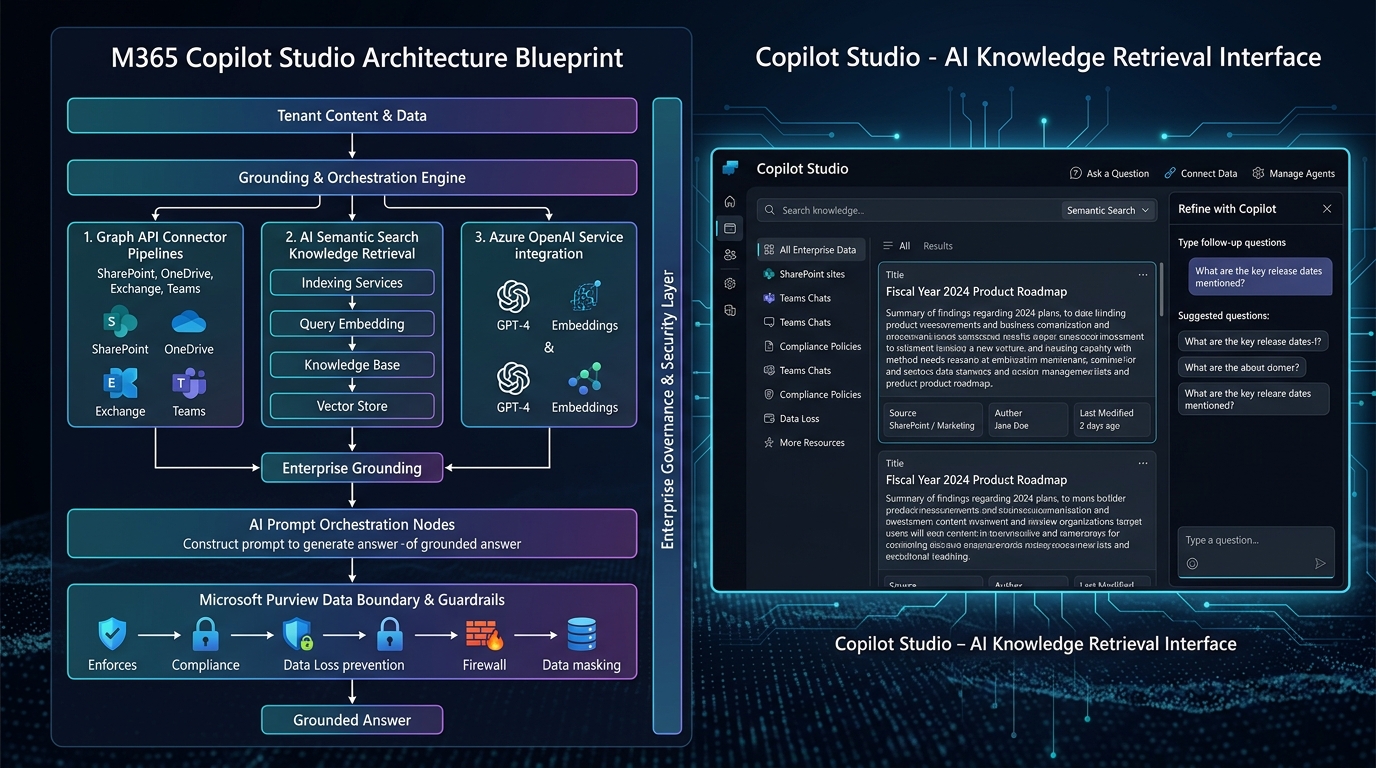
Copilot Studio Autonomous Agent & Semantic Index Guardrails
Multi-turn generative orchestrator grounded in 12,000+ proprietary SharePoint SOPs, protected by real-time Purview Restricted Search policy boundaries.
Autonomous HR & IT Tier-1 Copilot Studio Agent
Designed and deployed an enterprise Copilot Studio agent grounded on 12,000 SharePoint policy documents and ServiceNow REST APIs. Answers multi-turn employee benefits, compliance questions, and auto-provisions hardware requests.
Tenant Oversharing Remediation & Restricted Search
Prior to rolling out 4,000 M365 Copilot licenses, scanned 1,800 site collections to isolate overshared executive compensation spreadsheets, M&A memos, and confidential patent disclosures shared with "Everyone except external users".
Custom Microsoft Graph Connector for On-Prem ERP
Built a custom Microsoft Graph Connector ingesting 450,000 historical bill-of-materials and maintenance work orders from an on-premises Oracle database into the Microsoft 365 Semantic Index with native ACL security trimming.
Contract Analysis & Clause Extraction AI Workflow
Engineered an AI-augmented contract drafting and review solution inside Microsoft Word and Teams. Copilot references pre-approved boilerplate clauses stored in SharePoint to highlight non-standard indemnification terms.
Copilot License ROI & Prompt Efficacy Cockpit
Built an executive Power BI adoption cockpit for a global insurance client investing $1.8M in annual Copilot licensing. Correlated Viva Insights behavioral metrics with business unit output to reallocate dormant seats and boost active adoption.
Ready to Deploy Copilot Without Fear?
Lock down your sensitive SharePoint permissions, establish Purview DLP guardrails, and build custom agents that genuinely move the needle.
Enterprise Copilot Security Readiness & Oversharing Scorecard
Test your Microsoft 365 tenant against the top 5 vectors of AI data leakage before activating Copilot licenses across your enterprise workforce.
Security & DLP Checkpoints (Select Completed Items)
Frequently Asked Questions: Microsoft Copilot Security
Clear answers from Senior Architect Rohit Kumar regarding oversharing remediation, Purview sensitivity labels, and Copilot Studio architecture.
What are the biggest security risks when deploying Microsoft Copilot without governance?
What is Restricted SharePoint Search and how does it prevent Copilot oversharing?
How long does a typical Microsoft Copilot readiness assessment take?
What Microsoft licenses are required for Microsoft Copilot and Purview governance?
Can custom Copilot Studio agents access SharePoint libraries with item-level security?
Enterprise Copilot & Security Architecture Pillars
Ready to Secure Your Copilot Deployment?
Schedule a confidential 30-minute architectural consultation with Rohit Kumar to review your tenant readiness.
Related Technical Architecture & Case Studies
Global Investment Bank M365 Governance
SEC 17a-4 compliance, ethical walls, and 25,000-user tenant consolidation.
Healthcare 50TB Zero-Downtime Migration
HIPAA-compliant SharePoint Online migration with automated metadata tagging.
Copilot Security & Oversharing Prevention
Prevent data leakage across SharePoint repositories before activating AI licenses.
Power Platform CoE Governance Blueprint
Establish automated DLP policies, citizen developer guardrails, and ALM pipelines.
Enterprise Architecture Discovery & 1-on-1 Mentorship
Connect directly with Rohit Kumar for enterprise SharePoint & Power Platform scoping, zero-downtime migration runbooks, or personalized PL-600 & SC-300 exam coaching.
Related Resources
You Might Also Like
SharePoint Consulting
Expert SharePoint migration, governance, and development services.
Power Platform CoE
Implement governance and enable citizen developers at scale.
Microsoft Copilot
Prepare for AI-powered productivity with Copilot governance.
Zero-Downtime Migration
Migrate to SharePoint Online with zero business disruption.
About Rohit Kumar
18+ years of Microsoft 365 architecture experience.
Contact Us
Schedule a free consultation for your Microsoft 365 needs.