
Enterprise Power Platform Solutions
End-to-end Power Platform development and consulting. Power Apps, Power Automate, Power BI, and Copilot Studio solutions for business automation.
Complete Power Platform Stack
Power Apps
Canvas and model-driven apps for mobile and web business solutions
Power Automate
Workflow automation across Microsoft 365 and external systems
Power BI
Business intelligence dashboards and data analytics
Copilot Studio
AI-powered chatbots and conversational AI solutions
Power Platform Expertise
Power Apps Development
Custom canvas and model-driven applications that integrate seamlessly with SharePoint, Dynamics 365, and external APIs. Build mobile-first solutions with offline capabilities and enterprise-grade security.
- • Canvas apps with custom UI/UX design
- • Model-driven apps for Dataverse integration
- • Offline functionality and data synchronization
- • Azure AD integration and security
                            // Power Apps Formula Example

                            Filter('

                              SharePointList,

                              Status = "Active" &&

                              CreatedDate >= Today()

                            )
                            # Power Automate Flow

                            Trigger: SharePoint Item Created

                            Action: Send Approval Email

                            Condition: If Approved

                              Action: Create Document Set

                            Else: Send Rejection Notification
Power Automate Workflows
Automate business processes across Microsoft 365, external systems, and on-premises data. Build complex approval workflows, data synchronization, and integration solutions with error handling and monitoring.
- • Approval workflows and business process automation
- • SharePoint and Dataverse integration
- • External API and custom connector development
- • Error handling and retry policies
Power BI Analytics
Enterprise business intelligence solutions with interactive dashboards, data modeling, and DAX development. Transform raw data into actionable insights with real-time analytics and reporting.
- • Interactive dashboards and reports
- • Data modeling and ETL processes
- • DAX measure development
- • Embedded analytics and row-level security
                            // DAX Measure Example

                            Total Sales =

                            CALCULATE(

                              SUM(Sales[Amount]),

                              Sales[Status] = "Completed",

                              DATESYTD(Calendar[Date])

                            )
                            # Copilot Studio Topic

                            Trigger: "Check order status"

                            Action: Get Order Details

                            Response: "Your order #

                            {OrderNumber} is {Status}"

                            Fallback: Transfer to Agent
Copilot Studio Solutions
AI-powered chatbots and conversational AI solutions using Microsoft Copilot Studio. Build intelligent virtual assistants that integrate with your business systems and provide 24/7 customer support.
- • Custom chatbot development
- • Generative AI and knowledge base integration
- • Multi-channel deployment
- • Analytics and continuous improvement
Common Use Cases
Employee Onboarding
Automated onboarding workflows with Power Apps forms, approval processes, and IT provisioning automation.
Expense Management
Mobile expense submission apps with approval workflows, receipt scanning, and SAP/ERP integration.
Inventory Tracking
Real-time inventory management with barcode scanning, low-stock alerts, and supplier notifications.
Customer Service Portal
Self-service portal with Copilot Studio chatbot, knowledge base integration, and ticket management.
Sales Dashboard
Real-time sales analytics with Power BI, CRM integration, and performance tracking dashboards.
Project Management
Project tracking apps with resource allocation, milestone management, and automated status reporting.
Enterprise Power Platform Work Samples & Systems
Custom canvas apps, Dataverse relational data models, complex cloud flow orchestrations, and enterprise Power BI dashboards deployed for Fortune 500 corporations. Client names anonymized under NDA.
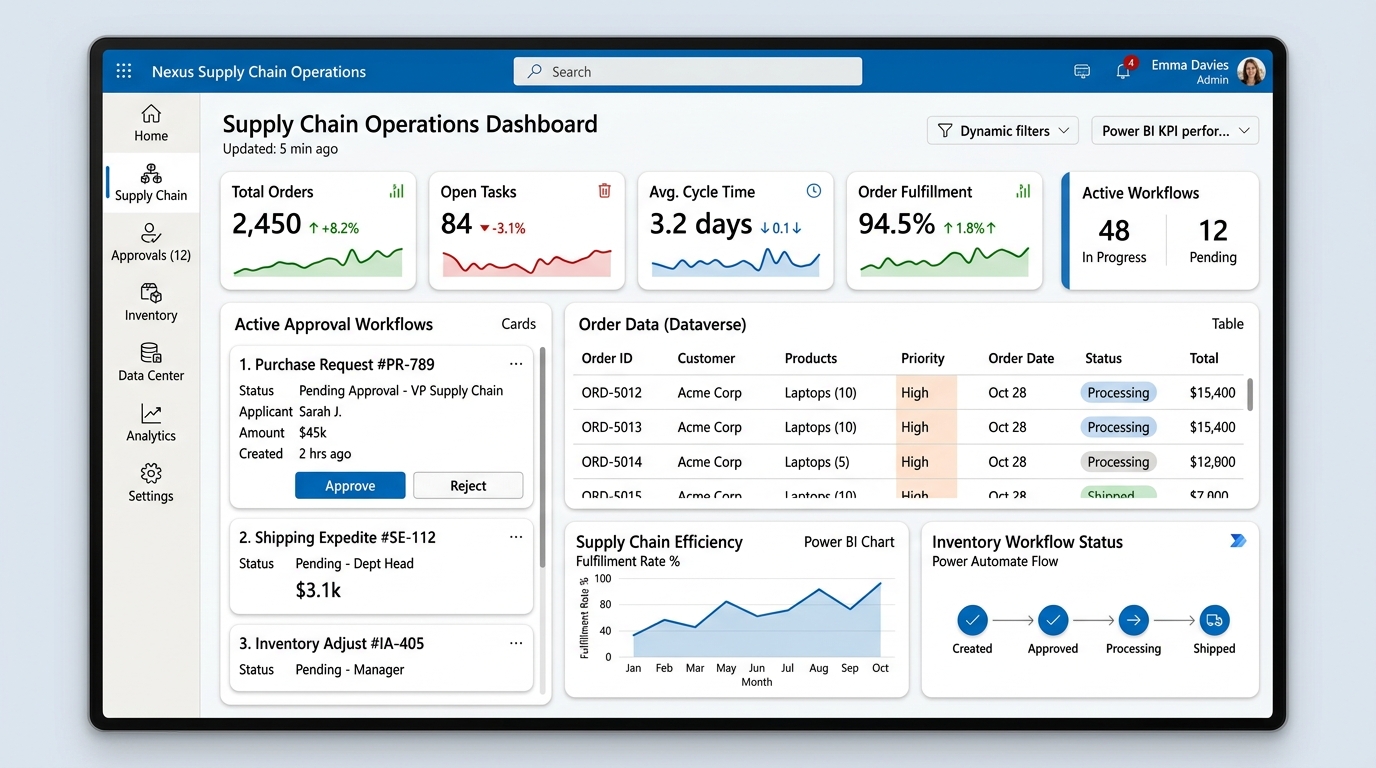
Shop-Floor Operations Canvas App & Dataverse Relational Engine
Offline-first local collection sync, barcode/RFID scanning components, multi-stage approval business process flows, and real-time SAP ERP sync.
Discrete Manufacturing Shop-Floor Execution App
Engineered an offline-capable tablet canvas application for 4,200 plant assembly technicians across North America and Europe. Replaced paper logbooks with automated parts traceability and automated scrap logging.
Global Capital Expenditure Approval Engine
Architected an enterprise Model-Driven App and complex Power Automate orchestration to govern multi-million dollar asset purchase requisitions across dynamic approval thresholds up to C-suite executive sign-offs.
Center of Excellence (CoE) Governance & DLP
Deployed the Microsoft Power Platform Center of Excellence Starter Kit and custom ALM pipelines across 14 autonomous business divisions. Prevented citizen developer sprawl while unlocking controlled citizen innovation.
Real-Time Logistics Fleet Power BI Command Hub
Designed high-throughput Power BI semantic models and executive telematics dashboards tracking real-time delivery performance, fuel variance, and driver safety scores across 4,500 active transit vehicles.
Customer & Broker Self-Service Claims Portal
Built a responsive external portal using Power Pages and Dataverse, allowing commercial brokers to submit claims, upload photographic loss evidence, and track real-time underwriting adjudication status.
Ready to Build Scalable Power Solutions?
From mission-critical custom apps to enterprise CoE governance setups, partner directly with a principal solution architect to maximize your M365 ROI.
Power Platform TCO & 3rd-Party SaaS Replacement Calculator
Estimate annual licensing savings by replacing expensive point SaaS subscriptions (Quickbase, DocuSign/eSign, Zapier, Monday.com) with Microsoft 365 native Power Apps, Power Automate, and Dataverse.
Average point solution costs ~$24/user/month across standalone workflow, form, and signature tools.
Estimated reduction in external vendor licenses after migrating legacy business processes into consolidated Microsoft 365 solutions.
Direct consultation with Rohit Kumar • PL-600 Certified
Frequently Asked Questions: Enterprise Power Platform & ALM
Direct technical guidance from Senior SharePoint & Power Platform Architect Rohit Kumar on solutions, security, and governance.
How do you implement ALM (Application Lifecycle Management) for Power Platform in enterprise DevOps?
ALM is implemented by separating development, test/UAT, and production into isolated Dataverse environments using managed solutions. All solution components (Power Apps, flows, connection references) are committed to GitHub or Azure DevOps repositories and deployed automatically via CI/CD pipelines.
When should an enterprise choose Dataverse vs SharePoint Lists as a backend?
SharePoint Lists are appropriate for lightweight departmental trackers under 5,000 items with simple flat schemas. Microsoft Dataverse is required when solutions demand complex relational data models, role-based column security, transactional integrity, multi-million record capacity, and ALM source control.
How does the Power Platform Center of Excellence (CoE) Starter Kit prevent tenant sprawl?
The CoE Starter Kit provides automated telemetry dashboards identifying orphan apps, unmanaged solutions, and high-risk connectors. It triggers automated compliance requests to makers and quarantines non-compliant assets before they create governance debt.
What DLP (Data Loss Prevention) policies prevent unauthorized API data exfiltration?
DLP policies categorize connectors into Business, Non-Business, and Blocked groups. By isolating corporate data sources (Dataverse, SharePoint, SQL) from consumer services (Twitter, Dropbox, Google Drive), Power Automate cannot transmit internal documents outside authorized corporate boundaries.
How do you optimize high-throughput Power Automate flows to avoid API request limits and throttling?
Optimization techniques include: (1) Replacing row-by-row apply-to-each loops with batch operations and OData filter queries, (2) Implementing concurrency control, (3) Utilizing child flows and webhook triggers, and (4) Offloading heavy data transformations to Azure Functions when payload sizes warrant.
Related Enterprise Architecture & Governance Guides
SharePoint Modernization: Migrating Classic Lists & Workflows
Replacing SharePoint 2013 workflows with modern Power Automate cloud flows.
Governance Pillar →Microsoft 365 Tenant Governance & DLP Rules
Purview sensitivity labels, retention policies, and cross-tenant boundaries.
AI Architecture →Copilot Studio Custom GPTs & Power Automate Actions
Extending Microsoft 365 Copilot with verified plugin endpoints.
Ready to Automate Your Business?
Let's discuss how Power Platform can transform your operations
Start Automation JourneyRelated Resources
You Might Also Like
SharePoint Consulting
Expert SharePoint migration, governance, and development services.
Power Platform CoE
Implement governance and enable citizen developers at scale.
Microsoft Copilot
Prepare for AI-powered productivity with Copilot governance.
Zero-Downtime Migration
Migrate to SharePoint Online with zero business disruption.
About Rohit Kumar
18+ years of Microsoft 365 architecture experience.
Contact Us
Schedule a free consultation for your Microsoft 365 needs.